
SIMATIC ITP1000
-
Series overview
-
More information
-
Select by specs
-
Troubleshooting
-
-
 Brand New In Stock
 Ships Today
 12 Months VICPAS Warranty
 Urgent Worldwide Shipping
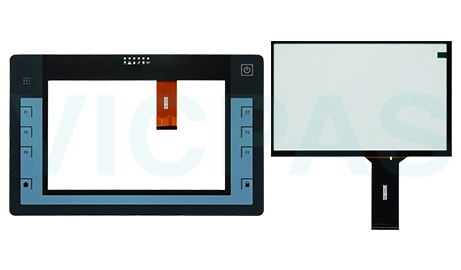
Find replacement touch screens and membrane keypads for ITP1000 Series HMI panels at VICPAS. This category includes operator interface components used for repairing damaged, worn, or unresponsive panels. Explore our range of ITP1000 replacement parts to help reduce downtime and maintain reliable system operation.
The most complete Siemens Simatic HMI Parts Models
-
In Stock
-
Designed for ITP1000 Systems: Developed for compatibility with Siemens ITP1000 operator panels.
-
Built to Last: Robust construction helps resist wear from everyday industrial use.
-
Quick and Easy Installation: Simplifies replacement procedures and minimizes downtime.
-
Dependable Quality: Supports efficient equipment operation and long-term reliability.
-
-
Troubleshooting Guide for Siemens SIMATIC ITP1000 Accessories
1. Touch Screen Issues:
Ensure the touch screen cable is correctly connected.
Restart the ITP1000 panel and verify touch functionality.
Inspect the screen for scratches, cracks, or other visible damage.
2. Touch Response Is Inaccurate:
Clean the screen surface to remove dust and contaminants.
Check system settings and recalibrate the touch screen if necessary.
3. Membrane Keypad Issues:
Verify proper installation and connector alignment.
Examine the keypad for wear, damage, or contamination.
Confirm compatibility with the specific ITP1000 model.
4. Persistent Problems:
Recheck all connections and installation procedures.
Replace damaged components to restore normal operation.
For further assistance, contact VICPAS.
| Model | Description | In stock |
|---|---|---|
| 6AV7880-2BB22-2FA2 | SIMATIC ITP1000 6AV7880-2BB22-2FA2 MMI Touch Screen Operator Panel Keypad. 1-Year Warranty-Tested-Factory Prices-Fast Shipping. | In Stock |
| 6AV7880-2BA22-1AA2 | Simatic ITP1000 6AV7880-2BA22-1AA2 Touch Panel Membrane Keyboard. 365 Days Warranty-Fully Tested-Factory Prices-Fast Shipping. | In Stock |
| 6AV7880-2AA32-1DA2 | Siemens SIMATIC ITP1000 6AV7880-2AA32-1DA2 Touch Screen Operator Keyboard Repair. 365-Days-Warranty-Fully Tested-Factory Prices. | In Stock |
| 6AV7880-0HB12-2DA2 | Siemens 6AV7880-0HB12-2DA2 Membrane Keyboard Keypad Touch Screen Film Repair. 365 Days Warranty-Fully Tested-Fast Shipping. | In Stock |
| 6AV7880-0HB12-1AA2 | SIMATIC ITP1000 6AV7880-0HB12-1AA2 Touch Screen Tablet Switch Membrane. 1-Year Warranty-Tested-Factory Prices-Fast Shipping. | In Stock |
| 6AV7880-0HA22-2AA2 | SIEMENS 6AV7880-0HA22-2AA2 HMI Panel Glass Operator Panel Keypad. 365 Days Warranty-Fully Tested-Factory Prices-Fast Shipping. | In Stock |
| 6AV7880-0HA12-1AA2 | Simatic ITP1000 6AV7880-0HA12-1AA2 Touch Screen Glass Keyboard Membrane Repair. 365-Days-Warranty-Fully Tested-Factory Prices. | In Stock |
| 6AV7880-0HA02-0AA2 | Siemens 6AV7880-0HA02-0AA2 Keypad Membrane Switch Touch Screen Display Repair. 365 Days Warranty-Fully Tested-Fast Shipping. | In Stock |
| 6AV7880-0FB22-2DA2 | SIMATIC ITP1000 6AV7880-0FB22-2DA2 MMI Touch Screen Operator Panel Keypad. 1-Year Warranty-Tested-Factory Prices-Fast Shipping. | In Stock |
| 6AV7880-0FA22-1AA2 | Simatic ITP1000 6AV7880-0FA22-1AA2 Touch Panel Keyboard Membrane. 365 Days Warranty-Fully Tested-Factory Prices-Fast Shipping. | Email/Call |
| 6AV7880-0AB32-1DA2 | Simatic ITP1000 6AV7880-0AB32-1DA2 Touch Screen Monitor Switch Membrane Repair. 365-Days-Warranty-Fully Tested-Factory Prices. | In Stock |
| 6AV7880-0AA32-2FA2 | Siemens 6AV7880-0AA32-2FA2 Membrane Keypad Overlay Touch Screen Tablet Repair. 365 Days Warranty-Fully Tested-Fast Shipping. | In Stock |
| 6AV7880-0AA32-2AA2 | SIMATIC ITP1000 6AV7880-0AA32-2AA2 Touch Screen Display Terminal Keypad. 1-Year Warranty-Tested-Factory Prices-Fast Shipping. | In Stock |
| 6AV7880-0AA31-1BA2 | Simatic ITP1000 6AV7880-0AA31-1BA2 Touchscreen Operator Keyboard. 365 Days Warranty-Fully Tested-Factory Prices-Fast Shipping. | Available Now |
| 6AV7880-0AA31-1AA2 | Simatic ITP1000 6AV7880-0AA31-1AA2 Touch Screen Display Membrane Keypad Repair. 365-Days-Warranty-Fully Tested-Factory Prices. | Email/Call |
| 6AV7880-0AA22-2DA2 | SIMATIC ITP1000 6AV7880-0AA22-2DA2 Terminal Keypad Touch Screen Film Repair. 365 Days Warranty-Fully Tested-Fast Shipping. | In Stock |
| 6AV7880-0AA22-2CA2 | SIMATIC ITP1000 6AV7880-0AA22-2CA2 MMI Touch Screen Operator Panel Keypad. 1-Year Warranty-Tested-Factory Prices-Fast Shipping. | In Stock |
| 6AV7880-0AA22-1AA2 | Simatic ITP1000 6AV7880-0AA22-1AA2 Touchscreen Keyboard Membrane. 365 Days Warranty-Fully Tested-Factory Prices-Fast Shipping. | Available Now |
| 6AV7880-0AA21-0AA2 | SIMATIC ITP1000 6AV7880-0AA21-0AA2 Touch Screen Tablet Membrane Keyboard Repair. 365-Days-Warranty-Fully Tested-Factory Prices. | In Stock |
| 6AV7880-0AA12-0FA2 | SIMATIC ITP1000 6AV7880-0AA12-0FA2 HMI Touch Glass Operator Keyboard Repair. 365 Days Warranty-Fully Tested-Fast Shipping. | In Stock |
| 6AV7880-0AA12-0AA2 | SIMATIC ITP1000 6AV7880-0AA12-0AA2 MMI Touch Screen Operator Panel Keypad. 1-Year Warranty-Tested-Factory Prices-Fast Shipping. | In Stock |
| 6AV7880-0AA11-1AA2 | Simatic ITP1000 6AV7880-0AA11-1AA2 Touchscreen Keyboard Membrane. 365 Days Warranty-Fully Tested-Factory Prices-Fast Shipping. | Email/Call |
| 6AV7880-0AA11-0AA2 | SIMATIC ITP1000 6AV7880-0AA11-0AA2 Touch Screen Monitor Keypad Membrane Repair. 365-Days-Warranty-Fully Tested-Factory Prices. | In Stock |
| 6AV7880-0AA02-1AA2 | SIMATIC ITP1000 6AV7880-0AA02-1AA2 Touch Membrane Switch Membrane Repair. 365 Days Warranty-Fully Tested-Fast Shipping. | In Stock |
| 6AV7880-0AA02-0AA2 | SIMATIC ITP1000 6AV7880-0AA02-0AA2 Touch Screen Terminal Keypad Repair. 1-Year Warranty-Tested-Factory Prices-Fast Shipping. | Available Now |
 Fast Quote
 Fast Quote
 Worldwide Shipping
 12 Months Warranty
 Customize Service
- Phone
- *Title
- *Content
