
Troubleshooting Common OTC Robot Teach Pendant Problems: A Complete Expert Guide
Troubleshooting Common OTC Robot Teach Pendant Problems: A Complete Expert Guide
By the VICPAS Technical Team | Updated 2026
Table of Contents
- Why OTC Teach Pendants Fail in the Field
- 1. Touchscreen Unresponsive or Partial Dead Zones
- 2. Black Screen / No Display on Power-Up
- 3. Incomplete Display, White Screen, Vertical Lines, or Flickering
- 4. Membrane Keys or Buttons Unresponsive
- 5. Joystick / Enabling Device / E-Stop Problems
- 6. Communication Loss or “Cannot Enter System”
- Prevention Best Practices for OTC Teach Pendants
- How VICPAS Supports Your OTC Robot Teach Pendant Maintenance
- Conclusion
- References
The OTC (Daihen) Robot Teach Pendant is the primary human-machine interface for programming, jogging, monitoring, and troubleshooting OTC welding and handling robots. In demanding industrial environments—filled with welding spatter, dust, oil, vibration, and frequent handling—these pendants commonly develop issues that halt production.
This comprehensive guide consolidates real-world field experience and technical insights to help maintenance engineers, technicians, and production managers quickly diagnose and resolve the most frequent OTC Robot Teach Pendant problems. Whether you are dealing with an FD-series unit (such as FDTPDSJN-3L08, FD11, FD19, or FD21) or related models, the steps below follow a practical, safety-first approach.
At VICPAS, we have specialized in industrial HMI and teach pendant replacement parts for over 20 years. Our inventory includes genuine-compatible touchscreens, membrane keypads, LCD modules, housings, cables, and joysticks specifically for OTC / NACHi Daihen teach pendants—backed by a 1-year warranty, rapid worldwide shipping, and no minimum order quantity. Explore our full OTC range at here.
Why OTC Teach Pendants Fail in the Field
OTC teach pendants operate in harsh conditions. Common stressors include:
- Metal spatter and conductive dust entering seams
- Repeated cable flexing and strain
- Impact from drops or collisions
- Oil, grease, and chemical contamination on keys and screens
- Thermal cycling and power fluctuations
These factors accelerate wear on the resistive touchscreen, membrane keypad, LCD, joystick, emergency-stop button, and interconnect cables.
1. Touchscreen Unresponsive or Partial Dead Zones
Symptoms
Screen lights up but does not register touches, or only certain areas respond. Calibration fails.
Primary Causes
- Hardening, scratching, or delamination of the resistive ITO layer
- Metal spatter or debris trapped under the overlay
- Damaged ribbon cable between touch panel and main board
Troubleshooting & Fix
- Clean the screen thoroughly with isopropyl alcohol and a soft lint-free cloth.
- Attempt the standard 5-point calibration via the system constants menu.
- If calibration points cannot be registered, the touch panel is failed.
Recommended Solution
Replace the resistive touchscreen assembly (common part references include W-L02140 and equivalent FD-series overlays).
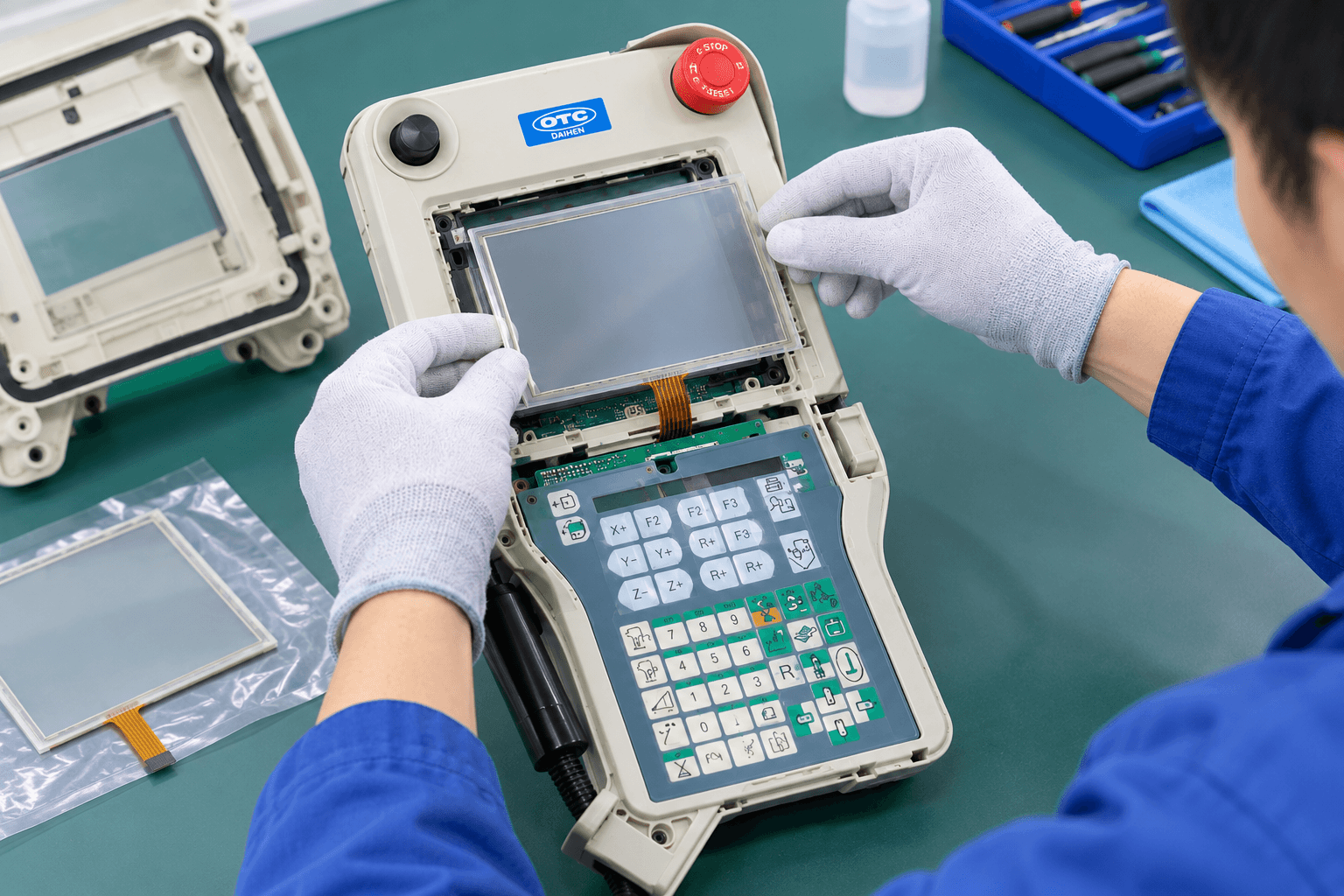
VICPAS stocks ready-to-install OTC-compatible touchscreen assemblies with precise fit and 1-year warranty. Browse available models here.
2. Black Screen / No Display on Power-Up
Symptoms
Pendant remains completely dark after controller power-on. No backlight or logo.
Primary Causes
- Unstable or missing 24 V supply through the pendant cable
- Failed internal power circuitry or CPU board
- Damaged LCD module or backlight inverter
- Broken conductors inside the teach pendant cable
Troubleshooting Steps
- Verify controller power and measure voltage at the pendant connector.
- Inspect and flex-test the entire cable for intermittent opens.
- Swap with a known-good pendant if available to isolate the fault.
Recommended Solution
- Repair or replace the LCD module / backlight assembly.
- If the main board is faulty, replace the CPU/main board assembly.
- Always inspect and, if necessary, replace the high-flex pendant cable.
3. Incomplete Display, White Screen, Vertical Lines, or Flickering
Symptoms
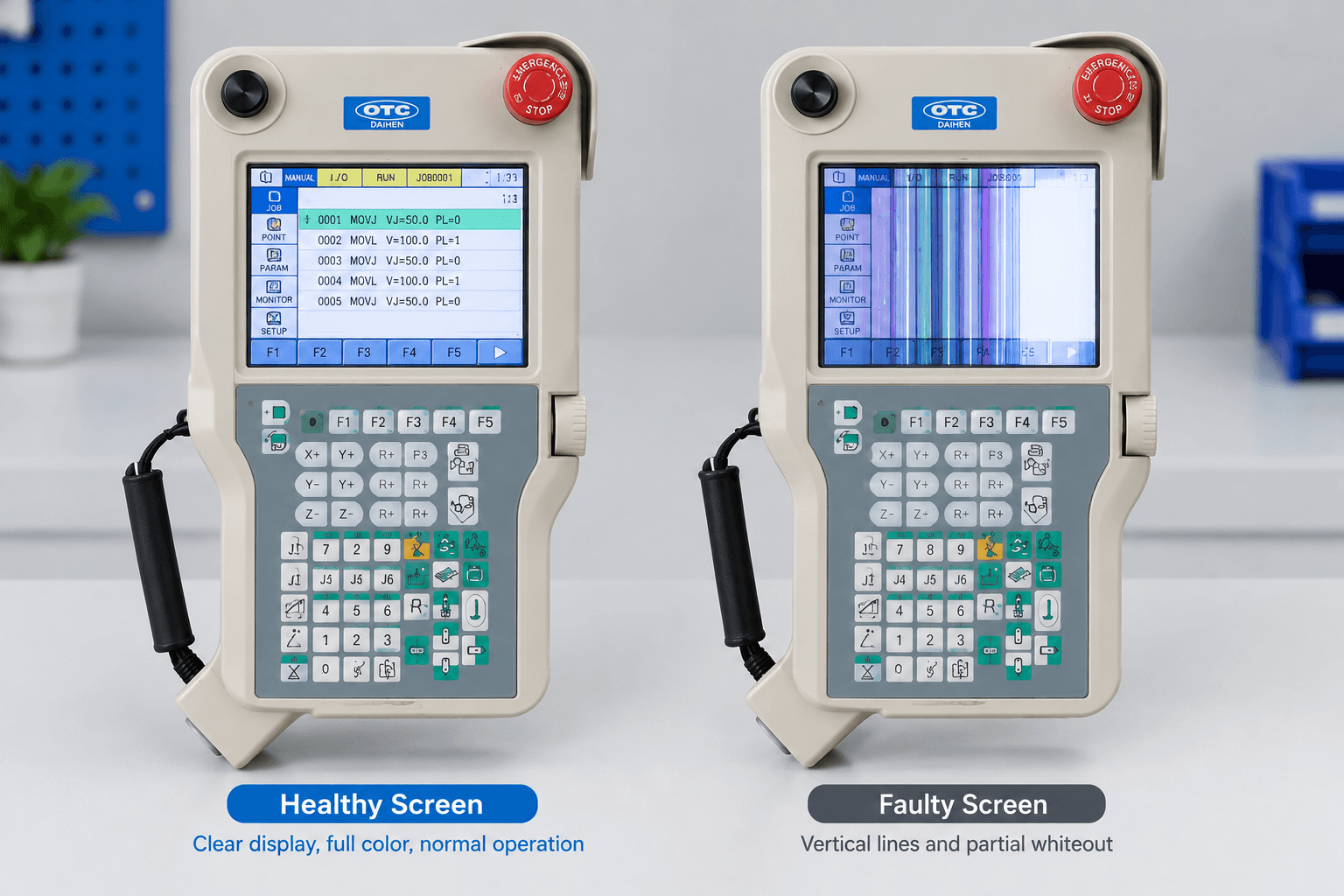
Partial image, colored lines, white screen, or intermittent flickering.
Primary Causes
- Cracked LCD glass from impact
- Failed driver IC or conductive rubber connections
- Aging CCFL / LED backlight or inverter board
- Loose internal ribbon cables
Fix
Replace the complete LCD display module. For flickering specifically, also check the high-voltage inverter board and power stability.
4. Membrane Keys or Buttons Unresponsive
Symptoms
Individual or multiple keys fail to register, sticky feel, or double inputs.
Primary Causes
- Worn conductive rubber pads or carbon contacts
- Contamination (dust, oil, spatter) under the membrane
- Damaged membrane overlay or flex circuit
Troubleshooting
Clean the keypad surface and test continuity with a multimeter while pressing each key. If no change in resistance occurs, the membrane is failed.
Solution
Replace the complete membrane keypad / front overlay. VICPAS supplies exact-fit membrane keypads for popular OTC models including FDTPDSJN-3L08, FDTPFSJN series, and FD19/FD21 variants.
5. Joystick / Enabling Device / E-Stop Problems
Symptoms
Joystick drift, dead zones, or failure to enable motors; E-stop that does not latch or reset properly.
Causes & Fixes
- Worn potentiometers or return springs in the 3-axis joystick → replace joystick assembly.
- Contaminated or worn enabling (deadman) switch → clean or replace.
- Mechanical wear of the dual-circuit E-stop button → replace with a high-reliability dual-channel unit.
These safety-critical components should never be bypassed. Always use properly rated replacements.
6. Communication Loss or “Cannot Enter System”
Symptoms
Pendant powers on but stays on logo screen, shows connection errors, or fails to communicate with the controller.
Common Causes
- Damaged or oxidized pendant cable connectors
- Bent or contaminated pins
- Corrupted system files / firmware
- Internal main-board component failure (e.g., swollen capacitors)
Steps
- Power-cycle the entire system (controller + pendant) for at least 30 seconds.
- Thoroughly inspect, clean, and reseat both ends of the cable.
- Test cable continuity.
- If the pendant remains stuck, system re-imaging or main-board repair/replacement may be required.
Prevention Best Practices for OTC Teach Pendants
- Apply a high-quality industrial screen protector immediately on new or repaired units.
- Route and store the pendant cable properly; avoid sharp bends and floor traffic.
- Keep the pendant clean—wipe down after each shift in welding cells.
- Use a soft stylus rather than metal tools or weld wire for screen interaction.
- Maintain spare critical parts (touchscreen, keypad, cable, E-stop) on site to minimize downtime.
How VICPAS Supports Your OTC Robot Teach Pendant Maintenance
VICPAS (Guangzhou Vicpas Touch Technology Co., Ltd.) is a specialized manufacturer and supplier of HMI and robotic teach pendant spare parts with more than two decades of experience. We provide:
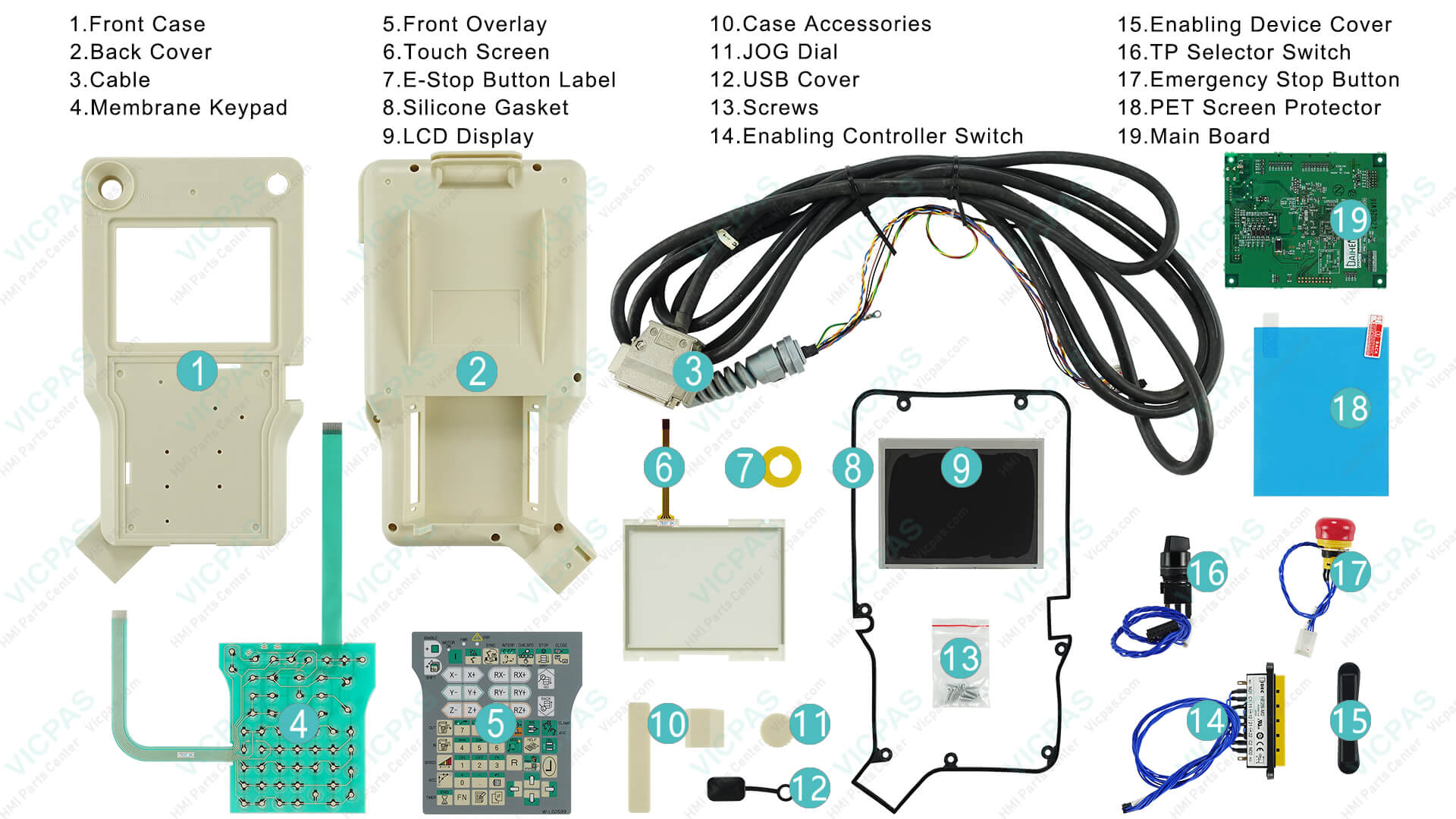
- Compatible touchscreens, membrane keypads, LCD displays, plastic housings, joysticks, cables, and complete assemblies for OTC / NACHi Daihen models
- 1-year VICPAS warranty on most products
- Same-day or next-day shipping options and worldwide delivery (DHL, UPS, FedEx, TNT)
- No minimum order quantity — even single-piece orders are welcome
- Customization support for hard-to-find or obsolete parts
- Dedicated technical team ready to help identify the correct part number
Browse our current OTC teach pendant inventory and request a fast quote: clip
or contact our team at sales@vicpas.com | +86 13763341328.
Conclusion
Most OTC Robot Teach Pendant problems fall into a predictable set of failure modes: touchscreen degradation, display failures, keypad wear, cable issues, and safety-switch problems. Systematic diagnosis—starting with power, cable, and visual inspection—resolves the majority of cases quickly and cost-effectively.
When replacement parts are required, choosing high-quality, properly tested components from a specialist supplier like VICPAS restores full functionality with minimal downtime and long-term reliability.
Need help identifying the exact part for your OTC model? Send us the pendant model number or a photo of the label, and our engineers will recommend the correct solution.
Keep your OTC robots productive. Keep the right spare parts on hand.
References
- OTC Robot FD11 Teach Pendant Fault Diagnosis and Repair Guide
- OTC Daihen FD Series Robot Teach Pendant Common Faults and Repair Methods
- OTC Robot Teach Pendant Cannot Enter System Fault Repair
- OTC Welding Robot Teach Pendant Key Failure Repair
- OTC Robot Teach Pendant Repair and Common Fault Analysis
- Common Faults in OTC Robot Teach Pendant Repair
- OTC Robot Teach Pendant Screen Flickering Repair
- Common Teach Pendant Issues and How to Fix Them
- Troubleshooting Common Teach Pendant Failures & Issues
- VICPAS OTC Teach Pendant Replacement Parts
Disclaimer: Always follow lock-out/tag-out procedures and manufacturer safety guidelines when working on robot systems. VICPAS supplies compatible replacement parts; we are not an authorized OTC/Daihen distributor.
 Fast Quote
 Fast Quote
 Worldwide Shipping
 12 Months Warranty
 Customize Service
- Phone
- *Title
- *Content
