
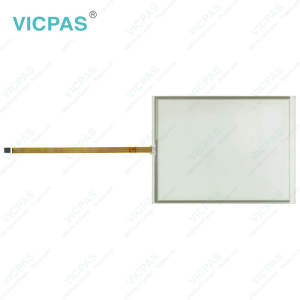
CP7221-0002-0000 CP7221-0002-0010 CP7221-0002-0020 CP7221-0002-0030 Touchglass Switch Membrane


| Share | |
|---|---|
| Categories | CP72XX |
| Brand | VICPAS |
| Model | CP7221-0002-0000 CP7221-0002-0010 CP7221-0002-0020 CP7221-0002-0030 |
| Product Line | CP72XX |
| LCD Type | TFT |
| Shipping Time | 3-5 Days |
| Supply Parts | Keypad Membrane Touch Panel |
| Environment | Free From Corrosive Gases |
| Size | 12.1'' |
| FOB port | Guangzhou, Shenzhen, Hongkong |
| Terms of Payment | Western Union, T/T, PayPal, Credit Card |
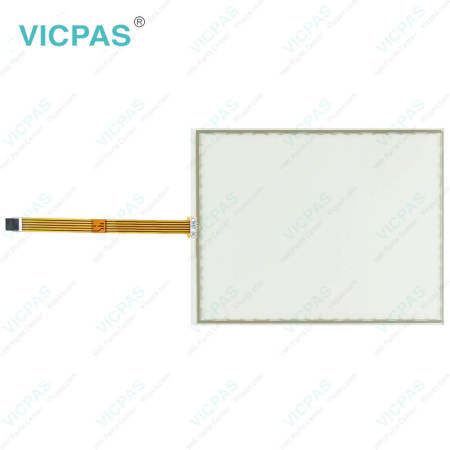
Beckhoff CP7221-0002-0000 CP7221-0002-0010 CP7221-0002-0020 CP7221-0002-0030 Touch Screen Panel Membrane Keyboard Repair
Order each part separately is available
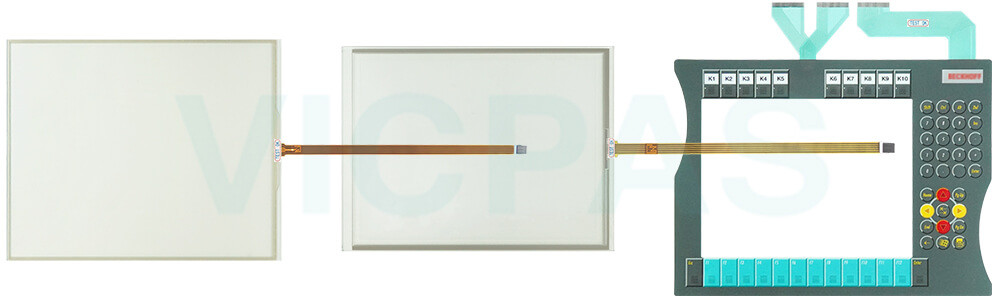
Choosing Beckhoff-compatible Beckhoff Touch Panel CP7221-0002-0000 CP7221-0002-0010 CP7221-0002-0020 CP7221-0002-0030 Terminal Keypad Touchscreen from VICPAS helps extend the lifespan of your equipment while reducing the risk of unexpected downtime. Beckhoff HMI Keyboard CP7221-0002-0000 CP7221-0002-0010 CP7221-0002-0020 CP7221-0002-0030 Touch Membrane Operator Keyboard is built using premium, durable materials, carefully selected and rigorously tested to ensure optimal compatibility, long-term availability, and dependable operation in the specified environmental conditions.
However, certain components, such as CP7221-0002-0000 CP7221-0002-0010 CP7221-0002-0020 CP7221-0002-0030 Membrane Switch Touch Screen Tablet, may have a limited service life if subjected to conditions like elevated ambient temperatures during use or storage, or extended periods of inactivity. For this reason, it is advisable to replace these parts once the remaining service life can no longer be accurately determined.
VICPAS supplies top-grade Beckhoff HMI CP7221-0002-0000 CP7221-0002-0010 CP7221-0002-0020 CP7221-0002-0030 Touch Screen Display Membrane Keyboard with a 12-month warranty, worldwide shipping, and responsive technical support. Please note that VICPAS assumes no liability for any damage occurring during replacement or maintenance procedures. Should you experience any difficulties when installing a new CP7221-0002-0000 CP7221-0002-0010 CP7221-0002-0020 CP7221-0002-0030 Keypad Membrane Touch Screen Film, our team is ready to assist you.
Specifications:
The table below describes the parameters of Beckhoff CP7221-0002-0000 CP7221-0002-0010 CP7221-0002-0020 CP7221-0002-0030 Switch Membrane Touch Screen Monitor.
| Storage Temperature: | -25 °C ... +65 °C |
| Cooling Method: | Natural Air Cooling |
| Operating Temperature: | 0 °C ... +55 °C |
| Brand: | Vicpas |
| Light Transmission: | Above 75% |
| Product Line: | CP72XX |
| Environment: | Free From Corrosive Gases |
| Warranty: | 365 Days |
| Relative Humidity: | 95% |
| LCD Type: | TFT |
Related Beckhoff Part No. :
| Beckhoff HMI | Description | Inventory status |
| CP7221-0001-0000 | Beckhoff CP72XX Touch Digitizer Glass Membrane Switch Replacement | In Stock |
| CP7221-0001-0010 | Beckhoff CP72XX Operator Keyboard Touch Screen Panel Repair | Available Now |
| CP7221-0001-0020 | Beckhoff CP72XX Touch Screen Display Membrane Keypad Replacement | In Stock |
| CP7221-0001-0030 | Beckhoff CP72XX Membrane Keypad Touch Screen Tablet Repair | Available Now |
| CP7221-0002-0000 | Beckhoff CP72XX Touch Screen Monitor Keyboard Membrane Replacement | In Stock |
| CP7221-0002-0010 | Beckhoff CP72XX Keypad Membrane Touch Screen Tablet Repair | Available Now |
| CP7221-0002-0020 | Beckhoff CP72XX HMI Touch Glass Membrane Keyboard Replacement | In Stock |
| CP7221-0002-0030 | Beckhoff CP72XX Keypad Membrane HMI Touch Glass Repair | Available Now |
| CP7221-0002-0040 | Beckhoff CP72XX Touch Digitizer Glass Switch Membrane Replacement | In Stock |
| CP7221-0002-0050 | Beckhoff CP72XX Terminal Keypad Touch Screen Monitor Repair | Available Now |
| CP7231-0000-0040 | Beckhoff CP72XX Touch Screen Film Membrane Keyboard Replacement | In Stock |
| CP7231-0000-0050 | Beckhoff CP72XX Terminal Keypad Touch Screen Glass Repair | Available Now |
| CP7231-0001-0040 | Beckhoff CP72XX Touch Screen Panel Operator Panel Keypad Replacement | In Stock |
| CP7231-0001-0050 | Beckhoff CP72XX Switch Membrane Touch Screen Film Repair | Available Now |
| CP7231-0002-0040 | Beckhoff CP72XX HMI Touch Glass Operator Keyboard Replacement | In Stock |
| CP7231-0002-0050 | Beckhoff CP72XX Operator Panel Keypad Touch Membrane Repair | Available Now |
| Beckhoff HMI | Description | Inventory status |
Beckhoff CP72XX Manuals PDF Download:
FAQ:
Question: Does CP7221-0002-0000 CP7221-0002-0010 CP7221-0002-0020 CP7221-0002-0030 Operator Keyboard Touch Screen Glass have any operation precautions?
Answer: Yes. Since The operation of the Panel PC occurs via the touch screen, the touch screen may only be actuated by finger tips or with the touch screen pen. The operator may wear gloves but there must be no hard particles such as metal shavings, glass splinters embedded in the glove.
Question: What should I pay attention to when installing CP7221-0002-0000 CP7221-0002-0010 CP7221-0002-0020 CP7221-0002-0030 HMI Touch Glass Membrane Keypad?
Answer:
• Position the Panel PC in such a way that reflections on the screen are avoided as far as possible.
• Use the position of the screen as a guide for the correct installation height; it should be optimally visible for the user at all times.
• The Panel PC should not be exposed to direct sunlight.
• When the unit is in its mounting position, the ventilation openings must not be obstructed.
• Extreme environmental conditions should be avoided as far as possible. Protect the Panel PC from dust, moisture and heat.
• The ventilation slots of the Panel PC must not be covered.
Common misspellings:
CP7221-002-0000CP7222-0002-0000
CP7221-0002-0010
CP72121-0002-0010
CP7221-0001-0010
CP7221-0002-0110
CP721-0002-0020
CP7221-00002-0020
CP7221-0002-020
CP7221-0003-0030
CP7223-0002-0030
CP7221-0002-0300
- 加载中···
- Phone
- *Title
- *Content
 Fast Quote
 Fast Quote
 Worldwide Shipping
 12 Months Warranty
 Customize Service
- Phone
- *Title
- *Content
