
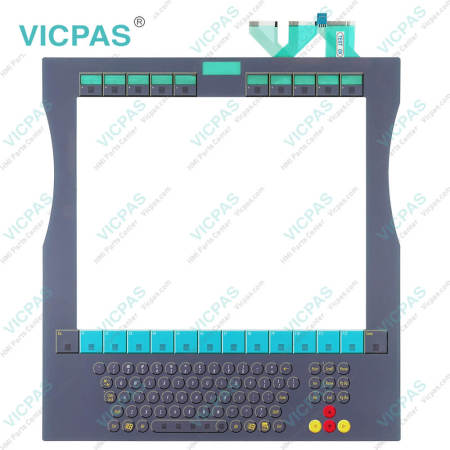
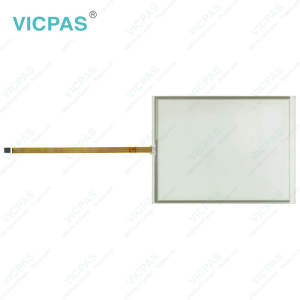
CP7221-0002-0050 CP7231-0000-0050 CP7231-0001-0050 CP7231-0002-0050 Touchglass Terminal Keypad


| Share | |
|---|---|
| Categories | CP72XX |
| Brand | VICPAS |
| Model | CP7221-0002-0050 CP7231-0000-0050 CP7231-0001-0050 CP7231-0002-0050 |
| Product Line | CP72XX |
| Size | 12'' |
| Shipping Time | 3-5 Days |
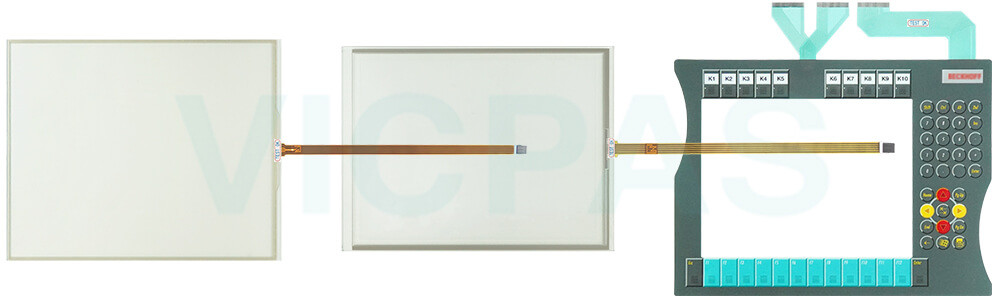
| Supply Parts | Membrane Switch Touchscreen |
| Environment | Free From Corrosive Gases |
| Warranty | 365 Days |
| FOB port | Guangzhou, Shenzhen, Hongkong |
| Terms of Payment | Western Union, T/T, PayPal, Credit Card |
Beckhoff CP7221-0002-0050 CP7231-0000-0050 CP7231-0001-0050 CP7231-0002-0050 Touch Screen Monitor Membrane Keypad Repair
Order each part separately is available
Unpacking
Please follow the steps below to unpack your Beckhoff HMI CP7221-0002-0050 CP7231-0000-0050 CP7231-0001-0050 CP7231-0002-0050 Touch Digitizer Glass Switch Membrane safely and correctly:
1. Remove the Packaging: Carefully take CP7221-0002-0050 CP7231-0000-0050 CP7231-0001-0050 CP7231-0002-0050 Membrane Keyboard Touch Screen Panel out of its outer carton and protective layers. Avoid using sharp tools directly on the product to prevent scratching the surface or damaging delicate components.
2. Retain the Packaging: Do not discard the original packaging materials. Our custom-designed packaging provides maximum protection during transport and is ideal for safely storing or relocating your HMI components in the future.
3. Verify the Delivery: Check that all ordered items, including accessories and mounting hardware, match your purchase order. For example, ensure Beckhoff Touch Panel CP7221-0002-0050 CP7231-0000-0050 CP7231-0001-0050 CP7231-0002-0050 Touch Screen Glass Terminal Keypad has its protective film intact, your membrane keypad has no visible wear, and your LCD display is clean and free of dust.
4. Inspect for Shipping Damage: Look for any visible signs of transit damage, such as cracks on the surface of CP7221-0002-0050 CP7231-0000-0050 CP7231-0001-0050 CP7231-0002-0050 Operator Keyboard Touch Screen Film, bent connectors on the LCD, or peeling layers on the keypad. If you notice any defects, contact VICPAS.
5. Environmental Considerations: Dispose of any excess packaging in accordance with local recycling regulations, helping us protect the environment while maintaining the integrity of our products.
Specifications:
The table below describes the parameters of Beckhoff CP7221-0002-0050 CP7231-0000-0050 CP7231-0001-0050 CP7231-0002-0050 Touch Membrane Operator Keyboard.
| LCD Type: | TFT |
| Light Transmission: | Above 75% |
| Environment: | Free From Corrosive Gases |
| Storage Temperature: | -25 °C ... +65 °C |
| Operating Temperature: | 0 °C ... +55 °C |
| Brand: | Vicpas |
| Warranty: | 365 Days |
| Cooling Method: | Natural Air Cooling |
| Product Line: | CP72XX |
| Relative Humidity: | 95% |
Related Beckhoff Part No. :
| Beckhoff HMI | Description | Inventory status |
| CP7221-0001-0000 | Beckhoff CP72XX Touch Digitizer Glass Membrane Switch Replacement | In Stock |
| CP7221-0001-0010 | Beckhoff CP72XX Operator Keyboard Touch Screen Panel Repair | Available Now |
| CP7221-0001-0020 | Beckhoff CP72XX Touch Screen Display Membrane Keypad Replacement | In Stock |
| CP7221-0001-0030 | Beckhoff CP72XX Membrane Keypad Touch Screen Tablet Repair | Available Now |
| CP7221-0002-0000 | Beckhoff CP72XX Touch Screen Monitor Keyboard Membrane Replacement | In Stock |
| CP7221-0002-0010 | Beckhoff CP72XX Keypad Membrane Touch Screen Tablet Repair | Available Now |
| CP7221-0002-0020 | Beckhoff CP72XX HMI Touch Glass Membrane Keyboard Replacement | In Stock |
| CP7221-0002-0030 | Beckhoff CP72XX Keypad Membrane HMI Touch Glass Repair | Available Now |
| CP7221-0002-0040 | Beckhoff CP72XX Touch Digitizer Glass Switch Membrane Replacement | In Stock |
| CP7221-0002-0050 | Beckhoff CP72XX Terminal Keypad Touch Screen Monitor Repair | Available Now |
| CP7231-0000-0040 | Beckhoff CP72XX Touch Screen Film Membrane Keyboard Replacement | In Stock |
| CP7231-0000-0050 | Beckhoff CP72XX Terminal Keypad Touch Screen Glass Repair | Available Now |
| CP7231-0001-0040 | Beckhoff CP72XX Touch Screen Panel Operator Panel Keypad Replacement | In Stock |
| CP7231-0001-0050 | Beckhoff CP72XX Switch Membrane Touch Screen Film Repair | Available Now |
| CP7231-0002-0040 | Beckhoff CP72XX HMI Touch Glass Operator Keyboard Replacement | In Stock |
| CP7231-0002-0050 | Beckhoff CP72XX Operator Panel Keypad Touch Membrane Repair | Available Now |
| Beckhoff HMI | Description | Inventory status |
Beckhoff CP72XX Manuals PDF Download:
FAQ:
Question: What should I do when I received the package of Beckhoff CP7221-0002-0050 CP7231-0000-0050 CP7231-0001-0050 CP7231-0002-0050 Touch Digitizer Glass Operator Panel Keypad?
Answer:
1. Inspect the packaging for any damage that may have occurred during transit.
2. Carefully remove the packaging.
3. Keep the packaging for potential future shipping.
4. Verify that all items are included by comparing the delivery with your order.
5. Check the contents for any visible shipping damage.
6. If any items are missing or damaged, please contact VICPAS immediately.
Question: What should I pay attention to if I want to replace my old CP7221-0002-0050 CP7231-0000-0050 CP7231-0001-0050 CP7231-0002-0050 Terminal Keypad Touch Screen Glass from the device?
Answer: You must first disconnect the power supply and cables from the device before starting to disassemble Beckhoff CP7221-0002-0050 CP7231-0000-0050 CP7231-0001-0050 CP7231-0002-0050 Touch Screen Monitor Membrane Switch. You can then remove it from the control cabinet.
Common misspellings:
CP7221-002-0050CP7221-0002-00050
CP71221-0002-0050
CP7231-000-0050
CP7231-0000-0005
CP7213-0000-0050
CP7231-0002-0050
CP7231-0001-0055
CP7231-00001-0050
CP7231-0002-0500
CP72231-0002-0050
CP7231-0003-0050
- 加载中···
- Phone
- *Title
- *Content
 Fast Quote
 Fast Quote
 Worldwide Shipping
 12 Months Warranty
 Customize Service
- Phone
- *Title
- *Content
