
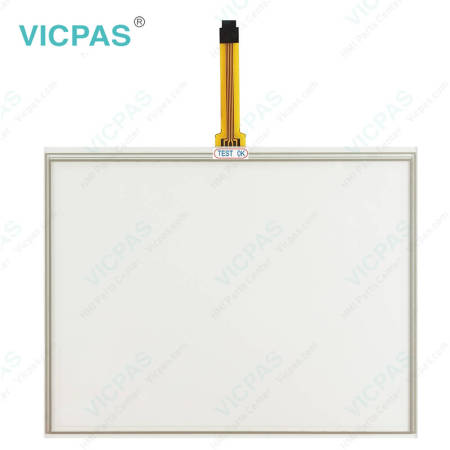
PH41208508-B-P0A1B-102B Touch Screen Panel Repair


| Share | |
|---|---|
| Categories | John Deere |
| Brand | VICPAS |
| Product Specifications | PH41208508-B-P0A1B-102B |
| Brand | John Deere |
| Warranty | 365 Days |
| Product Line | PH41208508-B-P0A1B-102B display |
| Supply | PH41208508-B-P0A1B-102B touchscreen lcd |
| Diagonal screen size | touch screen panel repair |
| FOB port | Guangzhou, Shenzhen, Hongkong |
| Terms of Payment | Western Union, MoneyGram, T/T, Paypal, PayPal, Credit Card |
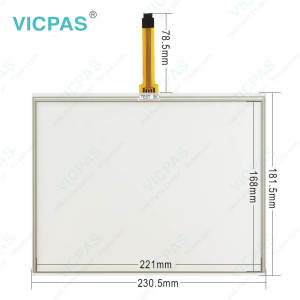
Supply John Deere PH41208508-B-P0A1B-102B Touchscreen Panel LCD Display for Repair
Order each part separately is available
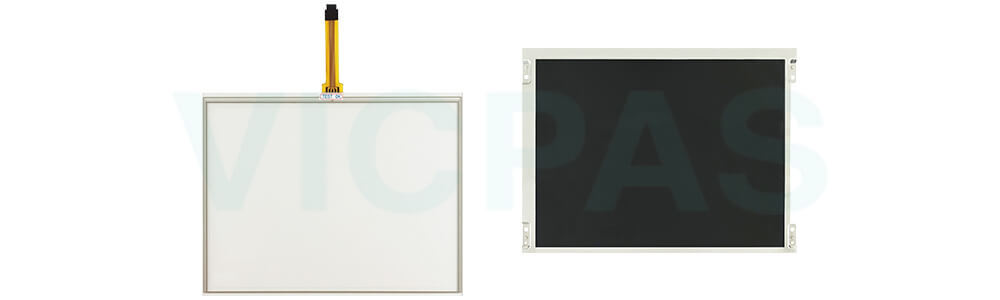
Touchscreen and LCD for John Deere Display Repair
This professional replacement touch digitizer glass and LCD screen for John Deere Greenstar 2630 displays, part numbers PH41208508-B-P0A1B-102B, delivers vibrant Full HD visuals and precise touch response for agricultural or industrial terminals. Whether you're replacing a cracked screen or restoring full touchscreen functionality, this assembly is engineered for high performance and durability in demanding field environments.
Key Features
◆ Compatible Replacement – Designed for compatible John Deere 2630 displays. Check the original part number, screen dimensions, and connector configuration before ordering.
◆ Combined LCD and Touchscreen – Includes both the LCD panel and touch digitizer glass, providing the main components needed for screen replacement.
◆ Repair-Friendly Design – Intended for display maintenance and refurbishment, helping simplify component sourcing when the original screen assembly needs replacement.
◆ Practical Maintenance Solution – Suitable for agricultural equipment repair, service centers, and spare parts inventory.
VICPAS supplies HMI Touch Screen Tablet and LCD Display for John Deere PH41208508-B-P0A1B-102B replacement; all of them are brand new with a 365-day VICPAS warranty.
Specifications:
The table below describes the parameters/Specifications of the John Deere GreenStar 3 GS3 2630 Monitor Display Touchscreen Panel Glass LCD Display.
| Part Number : | PH41208508-B-P0A1B-102B |
| Product Line: | John Deere |
| Screen diagonal: | 3'' - 22'' |
| Warranty: | 365 Days Warranty |
| Input Power: | 24 VDC |
| Operating Temperature: | -20° to 70° C (-4° to 158° F) |
| Storage Temperature: | -40° to 85° C (-40° to 185° F) |
| Input Type: | Touchscreen |
| Format: | Windows FAT or FAT32. |
| Connectivity: | USB 2.0 |
Related John Deere Monitor Series Part No. :
| John Deere Monitor | Description | Inventory status |
| PH41180581 LB08080085-01 | John Deere Touch Screen Tablet LCD Display Panel | In Stock |
| PH41208508-B-P0A1B-102B | John Deere Touch Panel Glass LCD Screen Repair | Available Now |
| PH41209509 LT104AC54000 | John Deere LCD Screen Touch Panel Replacement | In Stock |
| PH41212236 Rve.C | John Deere LCD Display Touchscreen Replacement | Available Now |
| PH41212236 Rve.C P1644-0703-1283 | John Deere Touch Screen Monitor LCD Display Panel | In Stock |
| PH41224499 REV.A | John Deere Touch Digitizer LCD Screen Replacement | In Stock |
| PF81431 | John Deere Touch Screen Glass LCD Display Repair | In Stock |
| PH41224328 Rev. C P5751-0708-0345 | John Deere LCD Display Screen Touchscreen Repair | Available Now |
| PH60227251 Rev C | John Deere Touch Screen Display LCD Display Panel | Available Now |
| PH41224496 REV.A P4528-0522-0608 | John Deere LCD Screen Touch Screen Panel Repair | In Stock |
| PH41224496 REV.A P4B78-1120-0303 | John Deere LCD Display Touch Digitizer Glass Repair | In Stock |
| PH41231525 Rev.B P7459-0407-0672 | John Deere Touch Membrane LCD Screen HMI Parts | Available Now |
| PH41209515 Rev.H | John Deere Touch Screen Panel LCD Display Repair | In Stock |
| PH41224459 REV A | John Deere LCD Display Touch Screen Replacement | Available Now |
| PH41217979 Rev.A | John Deere Touch Screen Monitor LCD Display Repair | In Stock |
| John Deere Display | Description | Inventory status |
FAQ:
Question:How to save The John Deere PH41208508-B-P0A1B-102B Display touchscreen setting and data?
Answer: Documentation data is saved continuously to permanent memory as it is recorded. Guidance lines are saved when the field setting is changed. Map data and some settings are saved only when the display is powered down, or a data backup is performed.
Option 1. Turn the vehicle key switch to shut down vehicle and wait for the Status LED to turn black.
Option 2. Insert a USB and back up the data.
Answer: The display will turn on and off with the vehicle key switch.
Turn ON the display
1. Turn vehicle key switch directly to the Run position.
IMPORTANT: Do NOT allow the display to boot up with the key in Accessory Mode and then crank the engine.
NOTE: Implement controllers may take several minutes to load (if connected).
Turn OFF the display
1. Turn vehicle key switch to shut down vehicle and wait for the display to save settings.
IMPORTANT: Never pull the power plug without first turning off the vehicle key switch. Data loss could occur.
NOTE: The display requires a constant power source so that it can save data and settings to permanent memory after the key is switched off. The Status LED is amber while the display saves data and settings.
Putting the Display in Standby
Use Standby mode only when the display is not being used for any operations. Standby mode will dim the display, mute tracking tones, suppress GPS alerts, and signal some implements to go into Standby mode.
Question:How to use Screen Protector in PH41208508-B-P0A1B-102B Display touchscreen?
Answer: The use of a screen protector is recommended to prevent wear to the touchscreen surface. Screen protector kits, made specifically for PH41208508-B-P0A1B-102B displays, can be purchased through your local John Deere dealer.
Screen protector has been preinstalled on the touch panel of your display. Removing the protector reduces the sunlight readability of the display. Please see instructions for replacement when necessary.
Question: What is the John Deere PH41208508-B-P0A1B-102B Monitor touchscreen Lcd display price?
Answer: Submit a fast quote, send VICPAS an email for best price.
Common misspellings:
PH41205508-B-POA1B-102B
P41208508-B-P0A1B-102B
PH41208508-B-P0A11B-102B
PH41208508-8-P0A1B-102B
PH41208508-B-P0A1B-10ZB
- 加载中···

- Phone
- *Title
- *Content
 Fast Quote
 Fast Quote
 Worldwide Shipping
 12 Months Warranty
 Customize Service
- Phone
- *Title
- *Content
