
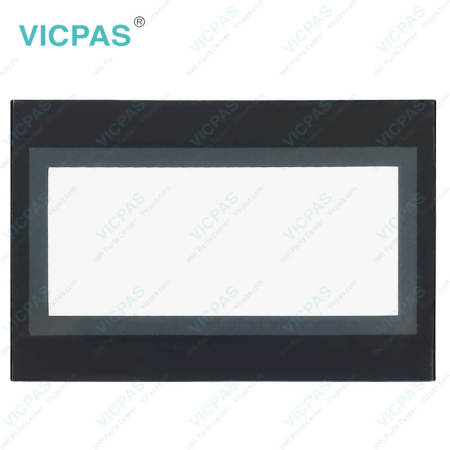
TOUGHBOOK G2 FZ-G2 Protective Film Touch Screen Display Replacement


| Share | |
|---|---|
| Categories | Panasonic TOUGHBOOK |
| Brand | VICPAS |
| Product Specifications | TOUGHBOOK G2 FZ-G2 |
| Supply Part | Touch Screen Film Front Overlay |
| Shipping Time | 3-5 Days |
| Warranty | 1 Year |
| Size | 10.1'' |
| Shipping | DHL/FedEx/UPS/TNT/EMS/Aramex /DPEX |
| FOB port | Guangzhou, Shenzhen, Hongkong |
| Terms of Payment | Western Union, T/T, PayPal, Credit Card |
Panasonic TOUGHBOOK G2 FZ-G2 Front Overlay Touch Screen Monitor Repair
Order each part separately is available
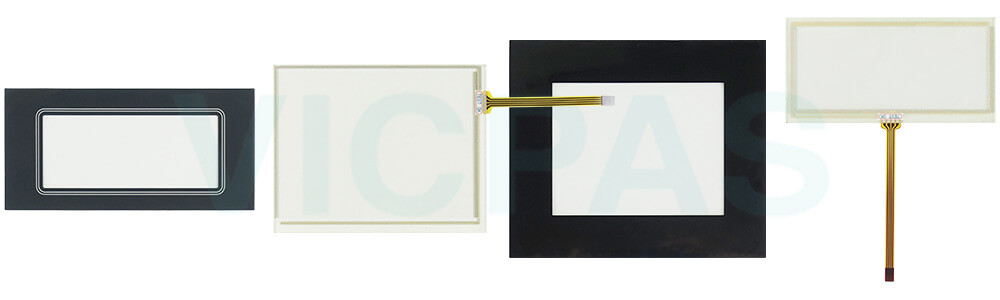
Proper handling during transportation is critical to preserving the condition and functionality of TOUGHBOOK G2 FZ-G2 Protective Film Touch Screen Panel. Throughout shipment, the device should be adequately protected against physical impacts, vibration, compression, and exposure to moisture. Insufficient or inappropriate packaging may leave TOUGHBOOK G2 FZ-G2 Touch Screen Tablet Front Overlay vulnerable to these external factors, potentially compromising its performance and structural integrity. Any visible damage to the packaging should be treated as a sign that the equipment may have been subjected to unfavorable transportation conditions. Therefore, the manufacturer's original packaging is recommended whenever the device is shipped, transported, or placed in storage.
Special precautions are necessary when Panasonic TOUGHBOOK G2 FZ-G2 Front Overlay Touch Screen Monitor is moved under low-temperature conditions or subjected to significant changes in ambient temperature. In such circumstances, condensation may form on the exterior or within the enclosure, creating a risk of short circuits and damage to internal electronic components. To avoid these problems, keep the equipment in a moisture-free environment and allow sufficient time for it to acclimate to the surrounding room temperature before connecting it to the power supply. If condensation is detected, do not switch on the device immediately. Instead, leave TOUGHBOOK Panasonic TOUGHBOOK G2 FZ-G2 Touch Digitizer Protective Film powered off for approximately 12 hours to ensure that any accumulated moisture has completely evaporated before operation.
Specifications:
The table below describes the parameters of Panasonic TOUGHBOOK G2 FZ-G2 Front Overlay Touch Digitizer Glass.
| Display Type: | TFT color |
| Product Line: | TOUGHBOOK |
| Size: | 10.1'' |
| Product Type: | Repair Component |
| Environment: | Free from Corrossive Gases |
| Part Number: | TOUGHBOOK G2 FZ-G2 |
| Packaging: | Individually Packed |
| Ambient Temperature: | -20°C (-4°F) ~ 60°C (140°F) |
| Warranty: | 365 Days |
| Shipping Time: | 3-5 Days |
Related Panasonic TOUGHBOOK Part No. :
| Panasonic TOUGHBOOK | Description | Inventory status |
| CF-18 | Panasonic TOUGHBOOK Touch Membrane Front Overlay Replacement | Available Now |
| CF-19 | Panasonic TOUGHBOOK Protective Film Touch Screen Panel Repair | In Stock |
| CF-29 | Panasonic TOUGHBOOK Front Overlay Touch Screen Film Replacement | Available Now |
| CF-30 | Panasonic TOUGHBOOK Touch Screen Glass Protective Film Repair | In Stock |
| CF-31 | Panasonic TOUGHBOOK Touch Screen Tablet Front Overlay Replacement | Available Now |
| TOUGHBOOK 33 CF-33 | Panasonic TOUGHBOOK Protective Film Touch Digitizer Glass Repair | In Stock |
| TOUGHBOOK 34 FZ-34 | Panasonic TOUGHBOOK Touch Screen Monitor Front Overlay Replacement | Available Now |
| TOUGHBOOK 40 FZ-40 | Panasonic TOUGHBOOK Touch Screen Display Protective Film Repair | In Stock |
| TOUGHBOOK 56 FZ-56 | Panasonic TOUGHBOOK Protective Film Touch Digitizer Glass Repair | In Stock |
| TOUGHBOOK G2 FZ-G2 | Panasonic TOUGHBOOK Touch Screen Monitor Front Overlay Replacement | Available Now |
| TOUGHBOOK G3 FZ-G3 | Panasonic TOUGHBOOK Touch Screen Display Protective Film Repair | In Stock |
| TOUGHBOOK Panasonic | Description | Inventory status |
Panasonic TOUGHBOOK Manuals PDF Download:
FAQ:
Question: How to maintain Panasonic TOUGHBOOK G2 FZ-G2 Touch Screen Monitor Protective Film?
Answer:
1. Use only a damp cloth to clean TOUGHBOOK G2 FZ-G2 Front Overlay Touch Screen Display. Do not use liquid or spray cleaners, as they may damage the screen.
2. When installing TOUGHBOOK G2 FZ-G2 Touch Digitizer Glass Protective Film, make sure it is placed on a stable and secure surface to avoid any damage.
3. Keep the Touch Screen Film away from direct sunlight to prevent discoloration or damage.
Question: What is the durability(touches) of Panasonic TOUGHBOOK G2 FZ-G2 Touch Screen Panel?
Answer: TOUGHBOOK G2 FZ-G2 Touch Screen Glass is designed to withstand a minimum of 1 million activations, ensuring long-lasting durability and reliable performance.
Common misspellings:
TOUGBOOK GG2 FZ-2G
TOUCHBOOK G2 FZG2
TOUHBOOK G1 F-G2
TOUGH BOOK G-2 ZF-G2
TOUGHBOOK 2G F-Z-G2
- 加载中···
- Phone
- *Title
- *Content
 Fast Quote
 Fast Quote
 Worldwide Shipping
 12 Months Warranty
 Customize Service
- Phone
- *Title
- *Content
